
Every business now claims to be “using AI.” Very few can point to a process that used to take a person three hours and now takes ten minutes. That gap — between AI as a talking point and AI as a working system — is where most of the value is still sitting unclaimed.
This isn’t another list of “10 AI tools you need in 2026.” It’s a breakdown of where automation genuinely removes human effort in a business, why most attempts fail to deliver, and how to think about it if you’re deciding where to start.
The Real Bottleneck Isn’t Intelligence — It’s Repetition
Most business processes aren’t hard. They’re repetitive. Someone reads an incoming email, decides which of five categories it belongs to, copies data into a spreadsheet, and forwards it to the right person. None of that requires judgment most of the time — it requires attention, and attention is exactly what gets expensive at scale.
This is the layer AI automation is actually good at right now: structured decisions applied to unstructured input. Reading a document and extracting the right fields. Classifying a support ticket. Drafting a first version of a response. Not because the AI is “smart” in some abstract sense, but because these tasks have a pattern, and pattern-matching against a pattern is what these models do well.
Where teams get disappointed is when they point automation at tasks that actually require judgment calls with real consequences — pricing exceptions, client-relationship decisions, anything where being wrong 5% of the time is expensive. That’s not a tooling problem. That’s a task-selection problem.
What an Actual Automation Pipeline Looks Like
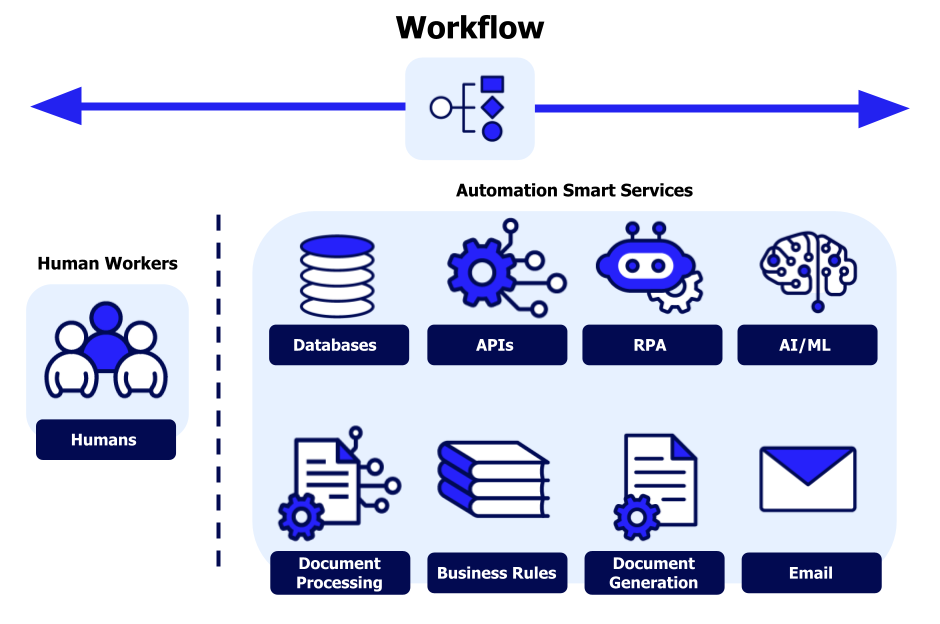
A useful way to think about this is three layers, not one:
1. Trigger and Data Layer Something happens — a form is submitted, an email arrives, a deal moves stage in the CRM. This layer is just plumbing: webhooks, API connections, database writes. Tools like n8n, Zapier, or Make sit here.
2. Decision Layer This is where an LLM earns its place — turning unstructured input (an email, a PDF, a transcript) into structured output (a category, a summary, a set of fields) that the rest of the system can act on. The key design choice here is scope: a model asked to make one narrow decision reliably beats a model asked to “handle the whole thing.”
3. Action Layer The structured decision triggers something real — an updated record, a sent message, a created ticket, a scheduled task. This is usually the layer businesses already have (CRM, helpdesk, accounting software); automation just needs to be wired into it correctly.
Most failed automation projects skip straight from layer 1 to layer 3 and expect the AI to be smart enough to bridge the gap in one giant prompt. It’s rarely smart enough, and even when it works, it’s fragile and impossible to debug when it breaks.
Where This Pays Off Fastest
Not every process is worth automating. The ones that pay off fastest share three traits:
- High volume, low variance — the same type of task happens dozens of times a day with roughly the same shape (support triage, lead qualification, invoice processing).
- Clear success criteria — you can tell, objectively, whether the output was right or wrong.
- A human is currently doing something a form or a script could mostly do — the “mostly” is important. Full automation isn’t the goal on day one; a first draft that a human reviews in 20 seconds instead of writing from scratch in 10 minutes is already a massive win.
Lead qualification, meeting-notes-to-action-items, invoice/PO matching, and first-line customer support responses are the categories businesses see returns from fastest — not because they’re the most exciting use cases, but because they’re the most repetitive ones.
The Part Nobody Puts in the Slide Deck: Maintenance
An automation that works on day one and breaks silently in week six is worse than no automation at all, because nobody notices until a customer complains. The systems that hold up long-term have two things baked in from the start:
- Observability — logging what the AI decided and why, so when something goes wrong you can find the exact step, not just “the automation broke.”
- A human fallback path — cases where the model is uncertain should route to a person, not get force-fit into an answer. Confidence thresholds matter more than raw accuracy scores.
This is usually the difference between an automation that survives contact with real customers and one that gets quietly switched off after a bad week.
Starting Point, Not End State
The businesses getting real hours back aren’t the ones with the most AI tools connected — they’re the ones who picked one repetitive, high-volume process, mapped it into trigger → decision → action, and built in a way to catch mistakes. Everything else compounds from there.
If you’re trying to figure out where that first process is in your own operation, that’s usually a shorter conversation than people expect — most businesses already know exactly which task everyone complains about doing manually.
Klevica helps businesses evaluate and apply AI and automation systems with a focus on what actually works in production — not just what demos well.